Print templates
How to print documents in your own layout: Excel and Word templates, variables, data from related documents, document sets, bulk printing and sending by email.
Every document in Skladnyk can be printed with the Print button on the document card. The menu lists ready-made system templates (delivery note, invoice, cash orders, supply contract and others) and your own templates.
Your own template is an ordinary Excel (.xlsx) or Word (.docx) file with variables in place of data. When printing, the program replaces them with the document data.
- An Excel template prints to Excel and PDF.
- A Word template prints to Word and PDF.
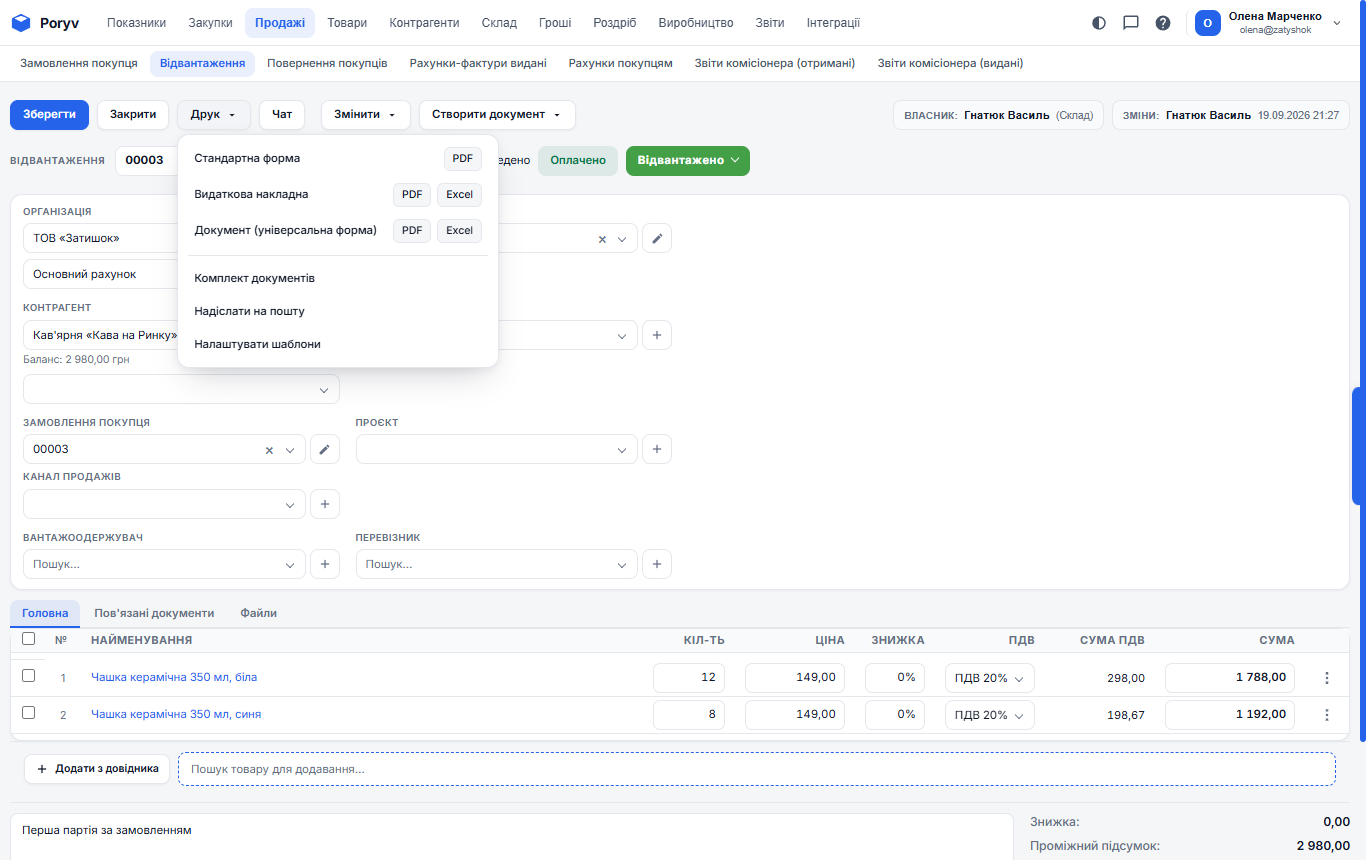
How to make your own template
- Open a document of the needed type and click Print - Configure templates.
- In System templates, click Download file next to the closest form.
- Open the file in Excel or Word and change what you need: logo, texts, columns. Leave the variables in curly braces if that data should still be printed.
- Save the file, return to the templates page, enter a name, choose the file and click + Add template.
- Click PDF in the Check column to see the document printed with your template.
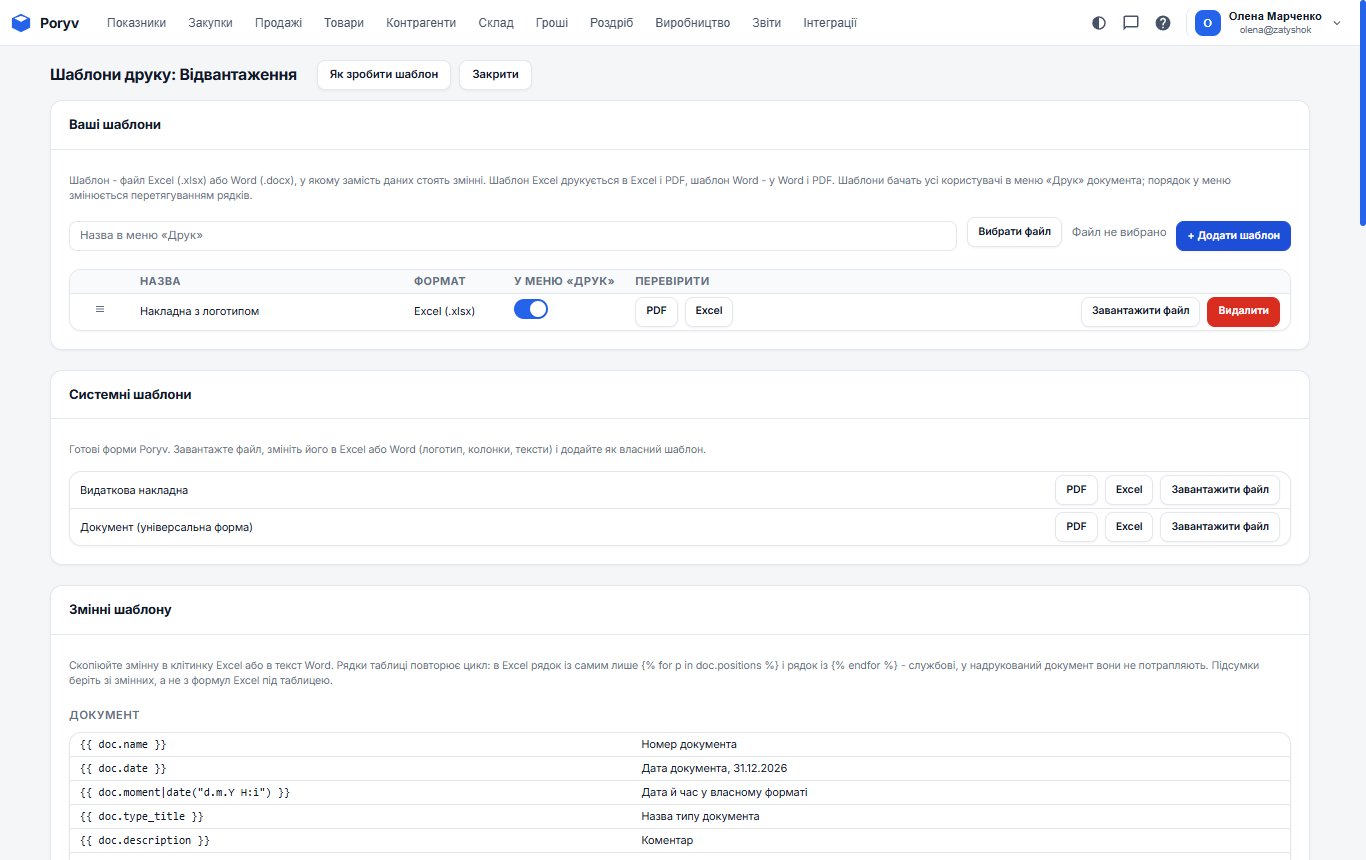
If the file has an error, the program reports it when you add the template and does not save it. All account users see the template; the switch hides it from the menu and rows can be dragged to change the order.
Writing variables
A variable is a name in double curly braces: {{ doc.name }} is the document number. A number in an Excel cell stays a number; add |money for the text "1 498,31".
Table rows are repeated by a loop. In Excel it takes three rows: a row containing only {% for p in doc.positions %}, a row with item data ({{ p.name }}, {{ p.sum }}) and a row containing only {% endfor %}. The first and third are service rows and do not appear in the printed document. In a Word table the tags are {%tr for p in doc.positions %} and {%tr endfor %}. Take totals from variables, not from Excel formulas below the table.
Condition: {% if doc.vat_enabled %}including VAT{% else %}no VAT{% endif %}.
Related documents are available as doc.related.<type> with the same fields as doc: {% for o in doc.related.customer_orders %}Order No. {{ o.name }}{% endfor %}. If there is no related document, the line stays empty.
The logo, stamp and signatures come from the organization card: {{ doc.organization.logo|image(18) }}, the number is the height in millimetres. A custom document field is {{ doc.attrs["Field name"] }}, a product field is {{ p.attrs["Field name"] }}.
Fields that exist only in one document type (carrier and vehicle in a shipment) are in doc.extra: {{ doc.extra.carrier.legal_title }}. The full list is at the bottom of the templates page.
Sets, bulk printing and email
- Print - Document set: tick the document and its related ones to get a single PDF.
- In a document list, tick rows, click Print and choose a form: a status page opens and shows Open file when the file is ready. Up to 200 documents at once; the file is kept for one day.
- Print - Send by email: the address comes from the counterparty card; you choose the form and the attachment format. Instead of a file you can send a link (**How to send - Link to the document**):
{link}in the text is replaced with the address. The link opens without signing in to Skladnyk and always shows the latest version of the document. Create a link without an email, or delete it, in the Link to the document block on the same page.
Templates for document lists and reports
Besides a single document you can print a document list as one file (a register) and reports. Select documents in the list, click Print and choose PDF or Excel in the List as one file block. In the Stock, Turnover and Profitability reports the Print button prints what is currently on the screen, filters included. In such templates rows are repeated by {% for row in rows %} ... {% endfor %}, fields come from row, and totals from totals. The full variable list is shown at the bottom of the list or report templates page.
Limits
- a template file is up to 5 MB, without macros;
- template printing works for documents with up to 2000 items;
- up to 200 templates per account; files count towards storage;
- up to 100 emails with documents per 5 minutes and 200 per hour per account.
List of variables
Document
| Variable | What it prints |
|---|---|
{{ doc.name }} |
Document number |
{{ doc.date }} |
Document date, 31.12.2026 |
{{ doc.moment|date("d.m.Y H:i") }} |
Date and time in a custom format |
{{ doc.type_title }} |
Document type name |
{{ doc.description }} |
Comment |
{{ doc.state }} |
Status |
{{ doc.store }} |
Warehouse |
{{ doc.project }} |
Project |
{{ doc.sales_channel }} |
Sales channel |
{{ doc.owner }} |
Responsible employee |
{{ doc.contract.name }} |
Contract: name |
{{ doc.contract.date }} |
Contract: date |
{{ doc.incoming_number }} |
Incoming number |
{{ doc.incoming_date }} |
Incoming date |
{{ doc.payment_purpose }} |
Payment purpose |
{{ doc.attrs["Назва поля"] }} |
Custom document field by its name |
Amounts
| Variable | What it prints |
|---|---|
{{ doc.sum }} |
Document total as a number (stays a number in an Excel cell) |
{{ doc.sum|money }} |
Total as text: 1 498,31 |
{{ doc.sum_words }} |
Amount in words |
{{ doc.vat_sum }} |
VAT amount |
{{ doc.payed_sum }} |
Paid |
{{ doc.shipped_sum }} |
Shipped |
{{ doc.currency.code }} |
Document currency code |
{{ doc.rate }} |
Document rate |
{{ doc.vat_enabled }} |
Whether VAT applies (for {% if %} conditions) |
{{ doc.vat_included }} |
Whether VAT is included in the price |
Organization and counterparty
| Variable | What it prints |
|---|---|
{{ doc.organization.legal_title }} |
Legal name of the organization |
{{ doc.organization.name }} |
Short name |
{{ doc.organization.edrpou }} |
USREOU code |
{{ doc.organization.inn }} |
Tax ID |
{{ doc.organization.legal_address }} |
Legal address |
{{ doc.organization.actual_address }} |
Actual address |
{{ doc.organization.phone }} |
Phone |
{{ doc.organization.email }} |
|
{{ doc.organization.director }} |
Director |
{{ doc.organization.accountant }} |
Chief accountant |
{{ doc.organization.bank.account_number }} |
Account number (IBAN) |
{{ doc.organization.bank.bank_name }} |
Bank name |
{{ doc.organization.bank.bic }} |
Bank code (MFO) |
{{ doc.agent.legal_title }} |
Counterparty: the same fields as the organization |
Organization images
| Variable | What it prints |
|---|---|
{{ doc.organization.logo|image(18) }} |
Logo; the height in millimetres goes in brackets |
{{ doc.organization.stamp|image(35) }} |
Stamp |
{{ doc.organization.director_signature|image(12) }} |
Manager signature |
{{ doc.organization.accountant_signature|image(12) }} |
Chief accountant signature |
Items (inside the loop)
| Variable | What it prints |
|---|---|
{% for p in doc.positions %} |
Loop start: a separate sheet row or a Word table row ({%tr for ... %}) |
{{ p.n }} |
Row number |
{{ p.name }} |
Name |
{{ p.code }} |
Code |
{{ p.article }} |
Article |
{{ p.uom }} |
Unit of measure |
{{ p.quantity }} |
Quantity |
{{ p.price }} |
Price |
{{ p.discount }} |
Discount, % |
{{ p.vat }} |
VAT rate, % |
{{ p.vat_sum }} |
Row VAT amount |
{{ p.sum }} |
Row total |
{{ p.attrs["Назва поля"] }} |
Custom product field by its name |
{% endfor %} |
Loop end: a separate row ({%tr endfor %} in Word) |
{{ doc.positions_count }} |
Number of items |
{{ doc.quantity_total }} |
Total quantity |
Related documents
| Variable | What it prints |
|---|---|
{% for o in doc.related.customer_orders %}№ {{ o.name }} від {{ o.date }}{% endfor %} |
All customer orders in the chain; a related document has the same fields as doc, including items |
{{ doc.related.customer_orders[0].name }} |
Number of the first order; empty if there is none |
{% for pay in doc.payments %}{{ pay.name }}: {{ pay.sum|money }}{% endfor %} |
All payments: incoming and outgoing payments and cash orders |
Other
| Variable | What it prints |
|---|---|
{{ today }} |
Today's date |
{{ user.name }} |
Who prints |
{{ 1234.5|words }} |
Any number in words as an amount |
{{ p.quantity|qty }} |
Quantity without trailing zeros |
Related document types
| Variable | What it prints |
|---|---|
doc.related.commission_reports_out |
Commission reports (issued) |
doc.related.commission_reports_in |
Commission reports (received) |
doc.related.invoices_out |
Customer invoices |
doc.related.customer_orders |
Customer order |
doc.related.sales_returns |
Customer return |
doc.related.enters |
Enters |
doc.related.cash_in |
Incoming cash order |
doc.related.payment_in |
Incoming payment |
doc.related.internal_orders |
Internal orders |
doc.related.inventories |
Inventories |
doc.related.cash_out |
Outgoing cash order |
doc.related.payment_out |
Outgoing payment |
doc.related.prepayment_returns |
Prepayment returns |
doc.related.prepayments |
Prepayments |
doc.related.purchase_orders |
Purchase orders |
doc.related.purchase_returns |
Purchase return |
doc.related.retail_demands |
Retail demand |
doc.related.retail_shifts |
Shifts |
doc.related.demands |
Shipments |
doc.related.invoices_in |
Supplier invoices |
doc.related.supplies |
Supplies |
doc.related.moves |
Transfers |
doc.related.losses |
Write-offs |
Updated: